Tax Process Overview
Phase 1: Submitting Your Tax Information
Complete annual questionnaire
Clients will receive an email from “LPC Tax” (notifications@cognitoforms.com) with access instructions for the annual questionnaire.
Gather tax information
Returning clients will have an “Items Received” document for the prior year return. This is a good starting list of what to provide and can be found in the prior year “Return Package”.
For a general outline of what to provide for individual 1040 returns, see: LPCtax.com/whattoprovide-individuals.
Upload documents
Securely upload documents at: LPCTax.com/sharefile.
Notify when ready
Email to confirm once the documents have been submitted and are ready for us to review.
Phase 2: Wrapping Up the Return
Review Return
Clients will receive a bookmarked PDF copy to review via ShareFile.
To walkthrough the return together, schedule a time at LPCTax.com/contact.
E-Sign for Return
Signers will receive an email via Sharefile (noreply@sf-notifications.com) with a secure link for electronic signing.
Signers must use the secure link in their email to complete signing.
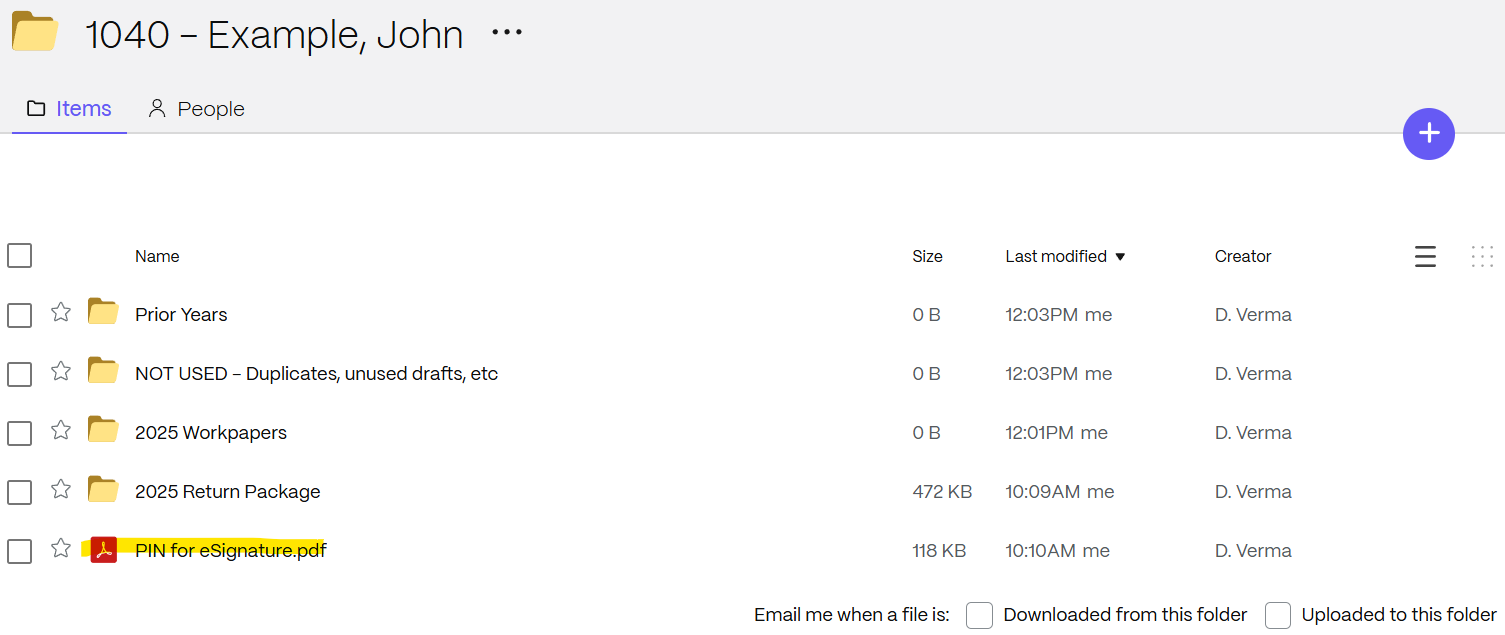
The PIN code to complete the signing will be saved in the top-level ShareFile (see example in Screenshot 1 below).
Pay Invoice
Clients will receive our invoice from CPACharge (noreply@cpacharge.com). The email will include a link to pay online.
Note that we are only able to send the invoice to one email. For joint returns, we typically send to the taxpayer listed first.
Arrange Return Payment
See tax return for any balance due and/or refund amounts.
For individual tax payment instructions, see LPCTax.com/payingtaxesonline.
Return Submission
Upon receipt of payment and the properly signed authorizations, we will submit the return.
The taxpayer listed first on the return will receive an emailed confirmation of e-filing for most return types.
Screenshot 1: